dmenu for custom command menus
2026-01-20
My favorite use cases for dmenu are:
- system command execution (
dmenu_run) - clipboard manager (greenclip + dmenu)
- custom command menus
- snippet insertion
1 is shipped with dmenu and for 2 just follow the greenclip link above.
This article covers 3. For 4 see dmenu-snippets.
Custom command menus
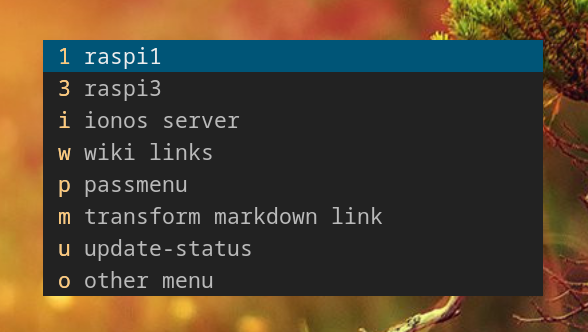
To me it's important that every command can be executed with a single key stroke. That's why I have added some patches to dmenu.
Prerequisites
All you need is dmenu with these patches applied:
- tsv-alt
- instant mode
- instant first char (only in my custom dmenu fork: b46daaf)
- center (optional)
Or simply use the custom branch of my fork:
~maxgyver83/dmenu - sourcehut git
These patches allow a quick selection/execution of frequently used commands. Usually, you use one key combo to show the menu and then a single key stroke to select an entry.
Shell scripts
First, add this little helper script to your $PATH:
menu:
#!/bin/sh
# -q quiet = no notification
# example usage: see ~/bin/main-menu
cmd=$(dmenu -c -1 -l 15 -fn 'monospace:size=16')
[ "$cmd" ] || exit
[ "$1" = "-q" ] || notify-send "$cmd" &
echo "$cmd" | ${SHELL:-/bin/sh} &
Delete (or replace) the notify-send line if you don't use it.
Then, create your first menu like this example:
main-menu:
#!/bin/sh
menu <<"eof"
1 raspi1	st -e ssh raspi1
3 raspi3	st -e ssh raspi3
i ionos server	st -e ssh -t ionos 'tmux a || tmux'
w wiki links	url="$(wiki-links --dmenu)"; [ "$url" ] && firefox "$url"
p passmenu	passmenu
m transform markdown link	transform-markdown-link
u update-status	update-status.bash
o other menu	other-menu
eof
Important:
- There is a tab before each command!
- Take care not to use the same selection key (first column) twice!
By the way: You can nest as many menus as you like.
As a final step, you could bind main-menu to a key combo in your ~/.config/sxhkd/sxhkdrc or whatever you use for global key bindings:
super + alt + space
    ~/bin/main-menu